Important NoteThis entire repo was AI created - including all of the data within. The intent was to A) help me with my personal electronics inventory; and B) see how I could use AI to make that process a bit easier. DO NOT TRUST!
Adafruit Metro M0 Express - designed for CircuitPython
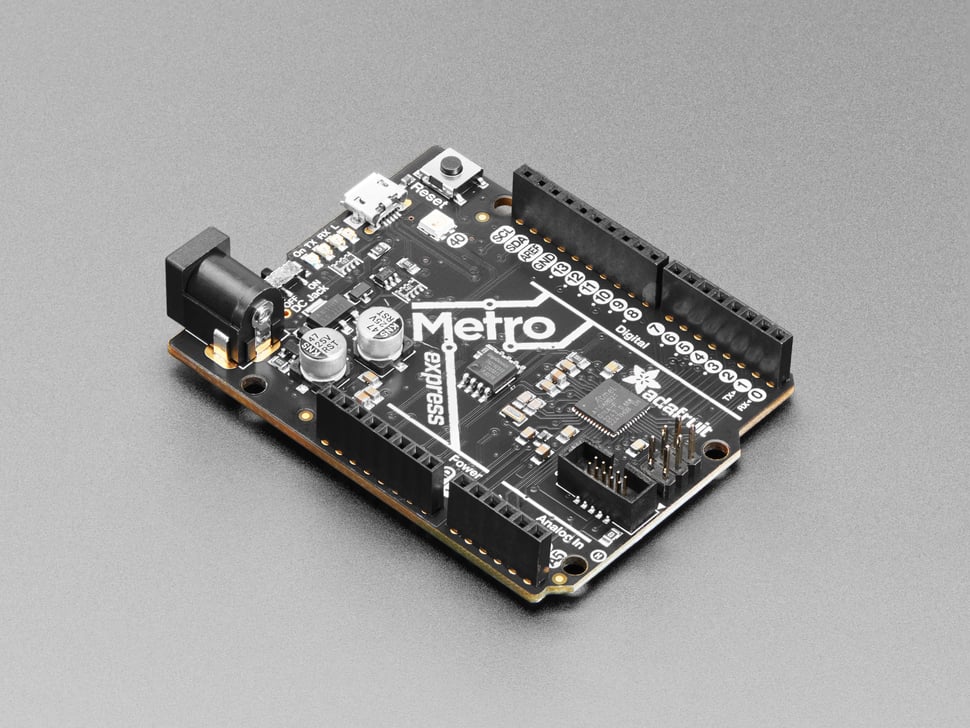
Overview
Metro is our series of microcontroller boards for use with the Arduino IDE. This new Metro M0 Express board looks a whole lot like our original Metro 328, but with a huge upgrade. Instead of the ATmega328, this Metro features a ATSAMD21G18 chip, an ARM Cortex M0+.
Please note that while this board was our first for CircuitPython usage, better and bigger chips have come out since then! We recommend the Metro M4 for a roomy, speedy, experience.
Specifications
- Processor: ATSAMD21G18 ARM Cortex M0+ @ 48MHz
- Architecture: 32-bit ARM Cortex M0+
- Flash Memory: 256KB
- RAM: 32KB
- SPI Flash: 2MB for CircuitPython storage
- Operating Voltage: 3.3V logic and power
- Input Voltage: 7-9V DC or 5V USB
- Dimensions: 71mm x 53mm / 2.8” x 2.1”
- Height (w/ barrel jack): 13mm / 0.5”
- Weight: 20g
Key Features
ARM Cortex M0+ Processor
- 48MHz Clock: 3x faster than Arduino Uno
- 32-bit Architecture: More efficient processing
- 256KB Flash: 8x more than ATmega328
- 32KB RAM: 16x more than ATmega328
- Low Power: Efficient ARM core
Built-in Storage
- 2MB SPI Flash: External storage chip
- CircuitPython Storage: Files, libraries, and scripts
- Arduino Access: Read/write files from sketches
- USB Access: Appears as USB drive
- Data Logging: Store sensor data and logs
Native USB Support
- Built-in USB: No FTDI chip needed
- Serial Communication: Virtual COM port
- HID Devices: Act as keyboard, mouse, or MIDI
- Mass Storage: Access SPI flash as drive
- Programming: Upload code via USB
Arduino Compatibility
- Arduino IDE: Full Arduino IDE support
- Shield Compatible: Works with most Arduino shields
- Pin Layout: Standard Arduino pin arrangement
- Libraries: Access to Arduino ecosystem
- Familiar Interface: Easy transition from Arduino Uno
Hardware Components
Power Management
- Auto Power Selection: USB or DC input
- 7-9V DC Input: 2.1mm jack with on/off switch
- USB Power: 5V from micro USB connector
- 3.3V Regulator: 500mA peak current output
- Power LEDs: Visual power indicators
User Interface
- 4 Indicator LEDs: Power, RX/TX, and pin 13 LED
- 1 NeoPixel: RGB LED on pin 40
- Reset Button: Manual reset capability
- Rubber Bumpers: Included to prevent sliding
Expansion and Connectivity
- 25 GPIO Pins: 5 more than Metro 328
- Arduino Shield Compatible: Standard shield pinout
- Breadboard Friendly: Easy prototyping
- Mounting Holes: 4 mounting holes for secure attachment
Software Support
CircuitPython
- Primary Platform: Designed for CircuitPython
- Pre-loaded: Comes with CircuitPython installed
- Interactive Development: REPL for real-time coding
- File System: 2MB flash appears as USB drive
- Extensive Libraries: Large CircuitPython ecosystem
Arduino IDE
- Full Support: Complete Arduino IDE compatibility
- Board Package: Adafruit SAMD boards package
- Library Support: Access to Arduino libraries
- Familiar Environment: Standard Arduino workflow
- Easy Migration: Upgrade from Arduino Uno
Development Features
- UF2 Bootloader: Drag-and-drop programming
- Native USB: No drivers needed on most systems
- Serial Monitor: Built-in debugging
- File Access: Read/write SPI flash from code
- Bossa Compatible: Standard ARM programming
Pin Configuration
Digital I/O (25 pins)
- GPIO: All pins can be digital I/O
- PWM: PWM outputs on almost all pins
- Interrupt: External interrupts on most pins
- 3.3V Logic: All pins operate at 3.3V
- Current: 7mA source/sink per pin
Analog Capabilities
- 12 Analog Inputs: 12-bit ADC resolution
- 1 Analog Output: 10-bit DAC on A0
- Reference: Internal or external voltage reference
- High Resolution: 4096 different values (12-bit)
- Multiple Channels: Simultaneous sampling possible
Communication Interfaces
- Hardware Serial: UART on pins 0 and 1
- Hardware I2C: SDA and SCL pins
- Hardware SPI: MOSI, MISO, SCK pins
- Multiple SERCOM: Additional I2C/SPI/UART possible
- USB: Native USB communication
Memory Architecture
Flash Memory (256KB)
- Program Storage: User code and libraries
- Bootloader: UF2 bootloader space
- Large Capacity: 8x more than Arduino Uno
- Fast Access: High-speed program execution
RAM (32KB)
- Variable Storage: Runtime data and buffers
- Large Capacity: 16x more than Arduino Uno
- Fast Access: Zero-wait-state memory
- CircuitPython: Plenty of space for Python objects
SPI Flash (2MB)
- File Storage: CircuitPython files and libraries
- Data Logging: Store sensor data and logs
- User Files: Images, sounds, configuration
- USB Access: Appears as CIRCUITPY drive
Performance Comparison
vs Arduino Uno
- 3x Faster: 48MHz vs 16MHz
- 8x More Flash: 256KB vs 32KB
- 16x More RAM: 32KB vs 2KB
- Native USB: No FTDI chip needed
- More Pins: 25 vs 20 GPIO pins
vs Metro M4
- Slower: 48MHz vs 120MHz
- Less Memory: 256KB vs 512KB Flash, 32KB vs 192KB RAM
- No FPU: No floating point unit
- Simpler: Fewer advanced peripherals
- Lower Cost: More affordable option
Applications
CircuitPython Projects
- Learning Programming: Great for beginners
- Interactive Projects: Sensors and displays
- IoT Devices: Connected projects
- Data Logging: Environmental monitoring
- Educational Tools: STEM education
Arduino Projects
- Upgraded Uno Projects: More memory and speed
- Sensor Networks: Multiple sensor integration
- Communication Projects: Multiple serial ports
- Display Projects: Graphics and animations
- Motor Control: PWM motor control
Professional Use
- Prototyping: Rapid development platform
- Product Development: Bridge to production
- Educational: Teaching embedded systems
- Research: Data collection and analysis
- Art Projects: Interactive installations
Power Specifications
Input Power
- USB Power: 5V from micro USB (500mA max)
- DC Power: 7-9V from 2.1mm jack
- Auto Selection: Automatic power source switching
- Power Switch: On/off control for DC input
Power Consumption
- Active Mode: ~30mA typical operation
- Sleep Modes: Various low-power modes available
- Peripheral Power: Additional current for active peripherals
- USB Power: Can power moderate loads from USB
Getting Started
CircuitPython Setup
- Connect USB: Board appears as CIRCUITPY drive
- Edit Files: Modify code.py in any text editor
- Install Libraries: Copy libraries to lib folder
- Run Code: Code runs automatically on save
- Use REPL: Interactive Python shell
Arduino Setup
- Install Arduino IDE: Download latest version
- Add Board Package: Install Adafruit SAMD boards
- Select Board: Choose “Adafruit Metro M0 Express”
- Install Libraries: Add required libraries
- Upload Sketches: Program via USB
Package Contents
- 1x Adafruit Metro M0 Express board
- 4x Rubber bumpers
- Documentation and getting started guide
- Pre-loaded CircuitPython firmware
Important Notes
- 3.3V Logic: Not 5V tolerant, use level shifters if needed
- Superseded: Metro M4 recommended for new projects
- Shield Compatibility: Most Arduino shields work with level shifting
- CircuitPython Pre-loaded: Ready to use out of the box
- File System: Don’t edit files while code is running
Advantages
- Easy to Use: Great for beginners
- CircuitPython Ready: Pre-loaded and configured
- Arduino Compatible: Familiar development environment
- More Capable: Significant upgrade from Arduino Uno
- Good Value: Excellent price/performance ratio
Limitations
- Superseded: Newer Metro M4 available with better specs
- 3.3V Logic: Requires level shifting for 5V devices
- Limited Performance: Slower than Metro M4
- Memory Constraints: Less memory than newer boards
- No FPU: No hardware floating point unit
Migration Path
For new projects, consider:
- Metro M4: More memory, faster processor, floating point
- Metro RP2040: Dual-core processor, more memory
- Feather M4: Smaller form factor with similar capabilities
- Circuit Playground Express: All-in-one learning board
Recommended Accessories
- Micro USB cable for programming
- 9V DC power adapter for standalone operation
- Level shifters for 5V device compatibility
- Sensors and actuators for projects
- Arduino shields (with level shifting if needed)