Important NoteThis entire repo was AI created - including all of the data within. The intent was to A) help me with my personal electronics inventory; and B) see how I could use AI to make that process a bit easier. DO NOT TRUST!
BBC micro:bit
Details
- Location: Cabinet-1, Bin 28
- Category: Microcontroller Boards
- Type: Educational Development Board
- Microcontroller: Nordic nRF51822
- Brand: BBC
- Part Number: 3530 (Adafruit)
- Quantity: 1
- Product URL: https://www.adafruit.com/product/3530
Description
Pocket-sized programmable computer designed specifically for education and beginners. Created by the BBC for teaching programming and electronics to children and newcomers. Features built-in sensors, LED display, and Bluetooth connectivity in a user-friendly package. Perfect introduction to coding, electronics, and physical computing.
Specifications
- Part Number: 3530 (Adafruit distribution)
- Microcontroller: Nordic nRF51822
- Architecture: 32-bit ARM Cortex-M0
- Clock Speed: 16MHz
- Operating Voltage: 3.3V
- Power Input: 3V (2×AAA batteries) or 5V (USB/external)
- Dimensions: 52.0mm × 42.1mm × 11.0mm
- Weight: 9.0g
- Temperature Range: -25°C to +75°C
Image
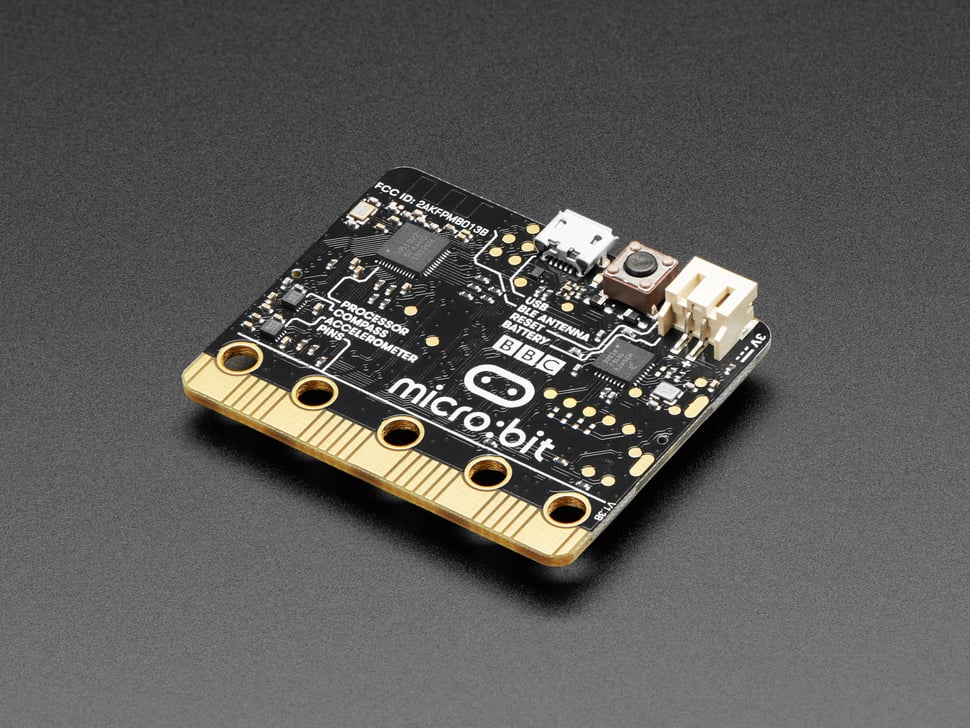
Features
- 5×5 LED Matrix: 25 programmable red LEDs for display
- Built-in Sensors: Accelerometer, magnetometer, temperature sensor
- User Interface: 2 programmable buttons (A and B)
- Bluetooth LE: Wireless communication and app connectivity
- Edge Connector: 25 pins for external connections
- USB Interface: Programming and power via micro-USB
- Beginner Friendly: Designed for educational use
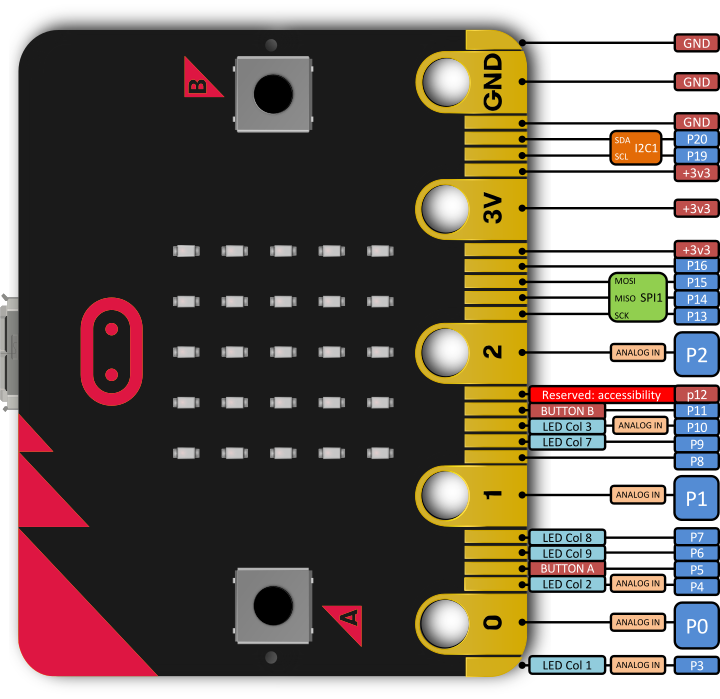
Pinout Diagram
Official micro:bit Pinout
Basic Wiring Examples
LED Connection
micro:bit Pin 0 → LED Anode (long leg)
LED Cathode (short leg) → 220Ω Resistor → micro:bit GND

Note: Pins 0, 1, 2 have touch sensing capability
Button/Switch Connection
micro:bit 3V → 10kΩ Pull-up Resistor → micro:bit Pin 1
micro:bit Pin 1 → Button → micro:bit GND

Code: pin1.read_digital() returns 1 when not pressed, 0 when pressed
Analog Sensor Reading
Sensor Output → micro:bit Pin 0, 1, 2, 3, 4, or 10 (analog pins)
Sensor VCC → micro:bit 3V
Sensor GND → micro:bit GND

Code: pin0.read_analog() returns 0-1023 (0-3.3V)
Servo Motor Connection
Servo Red Wire → micro:bit 3V
Servo Black/Brown Wire → micro:bit GND
Servo White/Orange Wire → micro:bit Pin 0 (PWM)

Code: pin0.write_analog(value) where value is 0-1023
I2C Device Connection
I2C Device VCC → micro:bit 3V
I2C Device GND → micro:bit GND
I2C Device SDA → micro:bit Pin 20 (SDA)
I2C Device SCL → micro:bit Pin 19 (SCL)

Note: Built-in pull-up resistors included
SPI Device Connection
SPI Device VCC → micro:bit 3V
SPI Device GND → micro:bit GND
SPI Device SCK → micro:bit Pin 13 (SCK)
SPI Device MOSI → micro:bit Pin 15 (MOSI)
SPI Device MISO → micro:bit Pin 14 (MISO)
SPI Device CS → micro:bit Pin 16 (or any digital pin)
Battery Power Connection
2x AAA Battery Pack → micro:bit JST Connector
OR
3V Coin Cell → micro:bit 3V and GND pins

Note: No built-in charging - use external charger for rechargeable batteries
Programming Setup Guide
MakeCode (Recommended for Beginners)
- Visit makecode.microbit.org in web browser
- Create new project
- Drag and drop blocks to create programs
- Download .hex file
- Copy .hex file to MICROBIT drive
MicroPython Setup
- Visit python.microbit.org in web browser
- Write Python code in editor
- Download .hex file
- Copy .hex file to MICROBIT drive
Arduino IDE Setup
- Install Arduino IDE
- Add micro:bit board package
- Install required libraries
- Select “BBC micro:bit” from Tools → Board
Programming Examples
MakeCode - Basic LED Control
// Show heart on button A press
input.onButtonPressed(Button.A, function () {
  basic.showIcon(IconNames.Heart);
});

// Show sad face on button B press
input.onButtonPressed(Button.B, function () {
  basic.showIcon(IconNames.Sad);
});

// Clear display on shake
input.onGesture(Gesture.Shake, function () {
  basic.clearScreen();
});

// Forever loop - scroll text
basic.forever(function () {
  basic.showString("Hello World!");
});
MicroPython - Sensor Reading
from microbit import *
import music

while True:
    # Read accelerometer
    x = accelerometer.get_x()
    y = accelerometer.get_y()
    z = accelerometer.get_z()

    # Display temperature
    temp = temperature()
    display.scroll(str(temp) + "C")

    # Check buttons
    if button_a.was_pressed():
        display.show(Image.HAPPY)
        music.play(music.BA_DING)

    if button_b.was_pressed():
        display.show(Image.SAD)
        music.play(music.WAWAWAWAA)

    # Detect shake
    if accelerometer.was_gesture('shake'):
        display.clear()
        music.play(music.JUMP_UP)

    sleep(100)
MicroPython - External LED Control
from microbit import *

# Blink external LED on pin 0
while True:
    pin0.write_digital(1)  # LED on
    sleep(500)
    pin0.write_digital(0)  # LED off
    sleep(500)
MicroPython - Analog Reading
from microbit import *

while True:
    # Read analog value from pin 0 (0-1023)
    sensor_value = pin0.read_analog()

    # Convert to voltage (0-3.3V)
    voltage = sensor_value * 3.3 / 1023

    # Display on LED matrix
    display.scroll(str(voltage))

    sleep(1000)
MicroPython - Touch Sensing
from microbit import *

while True:
    # Check touch on pins 0, 1, 2
    if pin0.is_touched():
        display.show("0")

    elif pin1.is_touched():
        display.show("1")

    elif pin2.is_touched():
        display.show("2")

    else:
        display.clear()

    sleep(100)
MicroPython - Radio Communication
from microbit import *
import radio

# Enable radio
radio.on()
radio.config(channel=7)  # Set channel (0-83)

while True:
    # Send message on button A
    if button_a.was_pressed():
        radio.send("Hello from micro:bit!")
        display.show(Image.ARROW_E)

    # Receive messages
    message = radio.receive()
    if message:
        display.scroll(message)

    # Clear display on button B
    if button_b.was_pressed():
        display.clear()

    sleep(100)
Built-in Components
- LED Display: 5×5 matrix of red LEDs
- Accelerometer: 3-axis motion detection
- Magnetometer: Digital compass functionality
- Temperature Sensor: Built-in temperature measurement
- Buttons: 2 user-programmable buttons (A and B)
- Reset Button: System reset functionality
- Power LED: Indicates power status
Connectivity & I/O
- Edge Connector: 25 pins total
- 5 large pins for alligator clips (0, 1, 2, 3V, GND)
- 20 additional pins for advanced connections
- GPIO: 19 general purpose I/O pins
- Analog Inputs: 6 pins with ADC capability
- PWM: Multiple pins support PWM output
- Communication: I2C, SPI, UART protocols supported
Programming Options
- MakeCode: Visual block-based programming (recommended for beginners)
- MicroPython: Text-based Python programming
- JavaScript: Text-based JavaScript programming
- C/C++: Advanced programming with mbed
- Scratch: Visual programming environment
Sensors & Capabilities
- Motion Detection: 3-axis accelerometer for tilt and shake detection
- Compass: Digital magnetometer for direction sensing
- Temperature: Built-in temperature sensor
- Light Sensing: LED matrix can detect ambient light levels
- Touch Sensing: Logo and pins can detect touch
Power Options
- USB Power: 5V via micro-USB connector
- Battery Pack: 3V via 2×AAA battery pack (not included)
- External Power: 3V via edge connector pins
- Power Management: Automatic switching between power sources
Educational Features
- Curriculum Aligned: Designed for UK computing curriculum
- Age Appropriate: Suitable for ages 7 and up
- Cross-Curricular: Integrates with math, science, art, music
- Progression Path: From blocks to text-based programming
- Community: Large educational community and resources
Programming Environment
- Web-Based: No software installation required
- Offline Options: Downloadable editors available
- Simulator: Test code without hardware
- Easy Upload: Drag-and-drop programming
- Multi-Platform: Works on Windows, Mac, Linux, tablets
Applications
- Education: Primary and secondary school computing lessons
- STEM Projects: Science, technology, engineering, math activities
- Art Projects: Interactive art and creative coding
- Games: Simple games using buttons and display
- Wearables: LED badges and interactive clothing
- Home Automation: Simple IoT projects
- Robotics: Control motors and sensors
Advantages
- Beginner Friendly: Designed specifically for newcomers
- No Setup Required: Works immediately out of the box
- Visual Programming: Block-based coding reduces syntax errors
- Built-in Everything: Sensors and display included
- Affordable: Low cost for educational institutions
- Robust: Designed to withstand classroom use
- Extensive Resources: Tutorials, lessons, and projects available
Ecosystem
- Accessories: Wide range of compatible add-ons
- Breakout Boards: Easy connection options
- Cases: Protective enclosures available
- Expansion: Compatible with various sensors and actuators
- Community: Active maker and educator community
Kit Contents
- BBC micro:bit board
- Quick start guide
- Packaging with getting started information
Additional Requirements
- USB Cable: Micro-USB cable for programming and power
- Battery Pack: 2×AAA battery holder for portable operation
- Computer: Any device with web browser for programming
Notes
- Version 1: This is the original micro:bit (Version 2 now available)
- No Longer Stocked: Adafruit no longer carries this version
- Upgrade Available: micro:bit V2 has improved features
- Educational Focus: Designed primarily for learning, not production
- Limited I/O: Fewer pins compared to other development boards
- Community Support: Extensive educational resources and community
Legacy Status
- Original micro:bit design from 2016
- Superseded by micro:bit V2 with additional features
- Still fully supported by programming environments
- Large installed base in educational institutions
- Compatible with most micro:bit accessories and resources