Important NoteThis entire repo was AI created - including all of the data within. The intent was to A) help me with my personal electronics inventory; and B) see how I could use AI to make that process a bit easier. DO NOT TRUST!
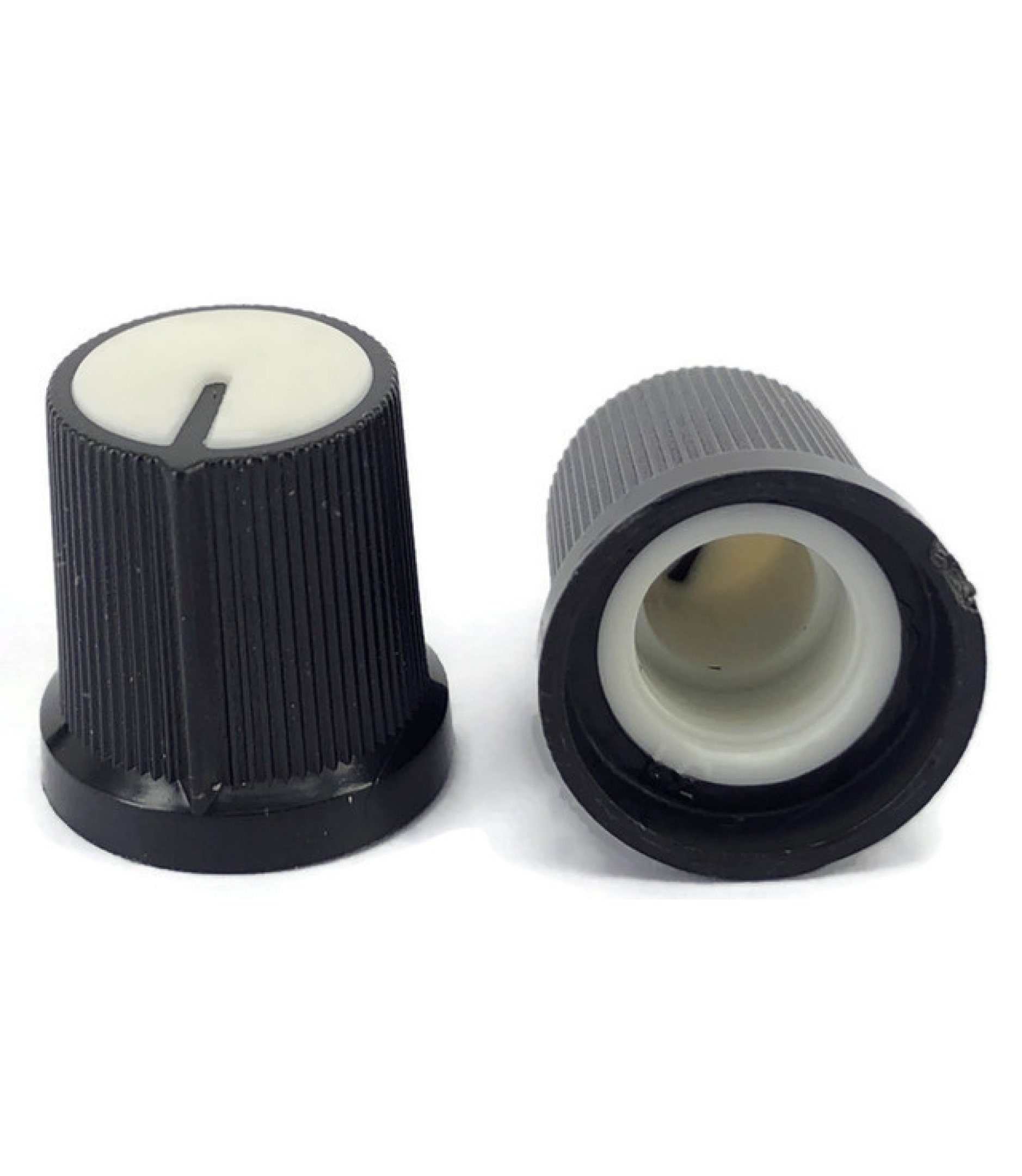
Black Knob White Top 15x15mm Shaft Diameter 6.00mm Split Shaft
Overview
Standard black plastic knob with white top indicator designed for 6mm split shaft potentiometers and rotary controls. The 15x15mm size provides good grip and control precision, while the white top indicator makes it easy to see the current position. Commonly used in audio equipment, control panels, and electronic projects requiring user-adjustable parameters.
Location
Cabinet-5, Bin 6, Section A - Control Knobs
Images
Specifications
Physical Specifications
- Body Size: 15x15mm (diameter x height)
- Body Color: Black plastic
- Top Indicator: White plastic top with position indicator
- Shaft Type: Split shaft (slotted)
- Shaft Diameter: 6.00mm
- Mounting: Friction fit on split shaft
- Grip: Knurled or textured sides for easy gripping
Mechanical Specifications
- Material: ABS or similar plastic construction
- Shaft Fit: Split shaft design for secure mounting
- Rotation: 270° typical (depends on potentiometer)
- Torque: Low friction, smooth rotation
- Temperature Range: -20°C to +70°C (typical)
- Durability: 10,000+ rotation cycles
Compatibility
- Shaft Size: 6mm split shaft potentiometers
- Shaft Types: D-shaft, split shaft, slotted shaft
- Applications: Linear and logarithmic potentiometers
- Mounting: Push-on friction fit
Applications
Audio Equipment
- Volume Controls: Main and channel volume adjustment
- Tone Controls: Bass, treble, and midrange adjustment
- Balance Controls: Left/right channel balance
- Effects Controls: Reverb, delay, and other effect parameters
Control Panels
- Industrial Controls: Process parameter adjustment
- Test Equipment: Signal level and frequency controls
- Power Supplies: Voltage and current adjustment
- Function Generators: Frequency and amplitude controls
DIY Electronics
- Arduino Projects: Analog input controls for sensors and parameters
- Breadboard Prototyping: Temporary control interfaces
- Educational Projects: Variable resistance demonstrations
- Hobby Electronics: Custom control interfaces
Musical Equipment
- Synthesizers: Parameter control knobs
- Guitar Amplifiers: Gain, tone, and volume controls
- Mixing Boards: Channel level and EQ controls
- Effects Pedals: Parameter adjustment knobs
Installation
Mounting on Potentiometer
- Verify Shaft: Ensure potentiometer has 6mm split shaft
- Align Knob: Position knob with desired indicator direction
- Press Fit: Push knob firmly onto shaft until seated
- Test Rotation: Verify smooth operation and proper range
- Adjust Position: Reposition if needed for proper indication
Panel Integration
- Potentiometer Mounting: Mount potentiometer through panel
- Shaft Length: Ensure adequate shaft protrusion for knob
- Clearance: Verify knob doesn’t interfere with panel or other components
- Labeling: Add labels near knob for function identification
Removal and Replacement
- Gentle Removal: Pull knob straight off shaft (may require firm grip)
- Avoid Damage: Don’t twist or rock knob during removal
- Replacement: Clean shaft before installing new knob
- Proper Seating: Ensure knob is fully seated on shaft
Design Considerations
Visual Indication
- White Top: Provides clear position indication against dark backgrounds
- Contrast: High contrast between black body and white indicator
- Visibility: Easy to see in various lighting conditions
- Position Reference: Clear indication of current setting
Ergonomics
- Size: 15mm diameter provides good grip for most users
- Height: 15mm height allows comfortable finger operation
- Texture: Knurled or textured sides prevent slipping
- Smooth Operation: Low friction for easy adjustment
Electrical Considerations
- Insulation: Plastic construction provides electrical isolation
- No Electrical Contact: Knob doesn’t affect electrical characteristics
- Shaft Connection: Mechanical connection only
- Grounding: No electrical grounding required
Circuit Integration
Basic Potentiometer Circuit
VCC ----[Potentiometer]---- GND
              |
              +---- Signal Output
Arduino Analog Input
const int potPin = A0;
const int ledPin = 9;

void setup() {
  pinMode(potPin, INPUT);
  pinMode(ledPin, OUTPUT);
  Serial.begin(9600);
}

void loop() {
  int potValue = analogRead(potPin);
  int brightness = map(potValue, 0, 1023, 0, 255);

  analogWrite(ledPin, brightness);

  Serial.print("Pot Value: ");
  Serial.print(potValue);
  Serial.print(" - Brightness: ");
  Serial.println(brightness);

  delay(100);
}
Volume Control Circuit
Audio Input ----[10kΩ Potentiometer]---- Audio Output
                        |
                       GND
Troubleshooting
Common Issues
- Loose Fit: Knob slips on shaft - check shaft size and knob condition
- Difficult Removal: Knob stuck on shaft - use gentle rocking motion
- Poor Indication: White top not visible - clean or replace knob
- Rough Operation: Scratchy feel - check potentiometer condition
Maintenance
- Cleaning: Wipe with damp cloth, avoid harsh chemicals
- Lubrication: Not typically required for plastic knobs
- Replacement: Replace if cracked, worn, or loose fitting
- Storage: Keep in dry environment to prevent degradation
Sourcing Information
Supplier
- Tayda Electronics: Primary supplier
- Part Number: A0304
- Price: $0.37 per piece
- URL: https://www.taydaelectronics.com/black-knob-white-top-shaft-diameter-6-mm-split-shaft.html
Alternative Sources
- DigiKey: Various manufacturers available
- Mouser: Multiple knob options
- Amazon: Knob assortment packs
- AliExpress: Low-cost alternatives
Specifications to Match
- 6mm split shaft compatibility
- 15mm diameter (approximate)
- Black body with white indicator
- Plastic construction
- Push-on mounting
Storage and Handling
Storage Recommendations
- Dry Environment: Prevent moisture absorption
- Temperature Control: Avoid extreme temperatures
- Organization: Sort by shaft size and type
- Protection: Avoid crushing or deformation
Handling Tips
- Gentle Installation: Don’t force onto shaft
- Proper Removal: Pull straight, don’t twist
- Clean Handling: Keep fingerprints off indicator surfaces
- Inspection: Check for cracks before installation
Variants Available
Shaft Sizes
- 6mm: This variant (most common)
- 4mm: Smaller shaft applications
- 8mm: Larger shaft applications
- 1/4”: Imperial shaft size
Indicator Styles
- White Top: This variant (high contrast)
- Colored Tops: Red, blue, green indicators
- Line Indicators: Engraved or molded lines
- Pointer Styles: Arrow or dot indicators
Body Sizes
- 15mm: This variant (standard size)
- 20mm: Larger grip size
- 12mm: Compact applications
- 25mm: Large control applications
Tags
knobs, controls, hardware, mechanical, 6mm-shaft, split-shaft, black, white-top, potentiometer, audio, control-panel cabinet-5 status-available
Notes
These black knobs with white top indicators are versatile control elements suitable for a wide range of electronic projects. The 6mm split shaft compatibility makes them ideal for standard potentiometers used in audio equipment and control panels. The white top indicator provides excellent visibility for position reference, making them particularly useful in applications where precise control settings are important. Store in Cabinet-5, Bin 6, Section A for easy access during project builds. The plastic construction provides good durability while maintaining electrical isolation from the control circuit.