Important NoteThis entire repo was AI created - including all of the data within. The intent was to A) help me with my personal electronics inventory; and B) see how I could use AI to make that process a bit easier. DO NOT TRUST!
Circuit Playground Bluefruit - Bluetooth Low Energy
Overview
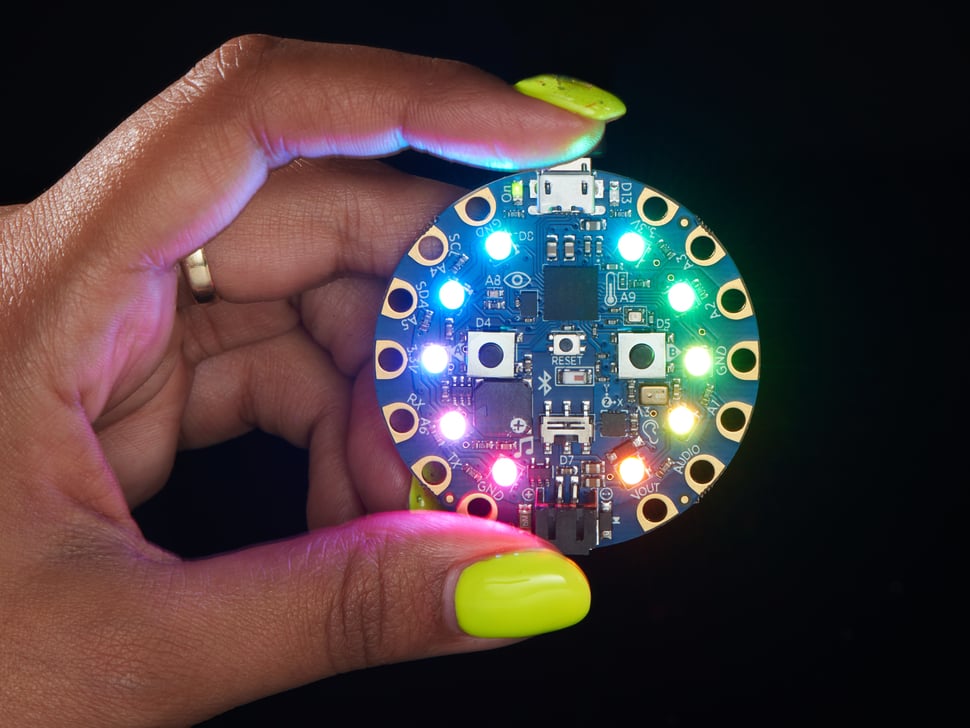
Circuit Playground Bluefruit is our third board in the Circuit Playground series, another step towards a perfect introduction to electronics and programming. We’ve taken the popular Circuit Playground Express and made it even better! Now the main chip is an nRF52840 microcontroller which is not only more powerful, but also comes with Bluetooth Low Energy support for wireless connectivity.
Specifications
- Microcontroller: nRF52840 Cortex M4 processor
- Bluetooth: Bluetooth Low Energy (BLE) support
- Operating Voltage: 3.3V
- Flash Memory: Built-in flash + 2MB SPI Flash storage
- Outer Diameter: ~50.6mm / ~2.0”
- Weight: 8.9g
Key Features
Wireless Connectivity
- Bluetooth Low Energy: Built-in BLE for wireless communication
- nRF52840 Chip: Powerful ARM Cortex M4 processor
- Wireless Projects: Create connected and IoT projects
- Mobile Integration: Connect to smartphones and tablets
- Low Power: Efficient wireless communication
Programming Options
- Arduino IDE: Full Arduino IDE support
- CircuitPython: Python interpreter with BLE libraries
- No MakeCode: Does not support MakeCode (no ETA for support)
- BLE Libraries: Extensive Bluetooth library support
Rich Hardware
- 10x Mini NeoPixels: Full-color RGB LEDs
- Motion Sensor: LIS3DH triple-axis accelerometer
- Temperature Sensor: Thermistor for ambient temperature
- Light Sensor: Phototransistor for light detection
- Sound Sensor: MEMS microphone
- Mini Speaker: Class D amplifier with magnetic speaker
Hardware Components
Sensors and Inputs
- LIS3DH Accelerometer: 3-axis motion with tap and free-fall detection
- Thermistor: Temperature sensing
- Phototransistor: Light sensing and color detection
- MEMS Microphone: High-quality audio input
- Capacitive Touch: Touch-sensitive input pads
Outputs and Communication
- 10x NeoPixels: Individually addressable RGB LEDs
- Class D Amplifier: High-quality audio output
- Bluetooth Radio: BLE communication
- USB Interface: Programming and serial communication
User Interface
- 2x Push Buttons: Labeled A and B
- 1x Slide Switch: Mode or power control
- Reset Button: Manual reset capability
- Status LEDs: Power and activity indicators
Bluetooth Capabilities
BLE Features
- Central/Peripheral: Can act as either role
- Multiple Connections: Support for multiple simultaneous connections
- Standard Services: Support for standard BLE services
- Custom Services: Create custom BLE services and characteristics
- Low Power: Efficient power consumption
Communication Options
- UART Service: Serial communication over BLE
- HID Service: Act as Bluetooth keyboard/mouse
- Custom Protocols: Implement custom communication protocols
- Sensor Data: Transmit sensor readings wirelessly
- Remote Control: Control devices remotely
Mobile Integration
- Smartphone Apps: Connect to iOS and Android apps
- Web Bluetooth: Connect to web applications
- Adafruit IO: Cloud connectivity through mobile device
- Custom Apps: Develop custom mobile applications
Pin Configuration
GPIO Pins (8 total)
- A0: Analog input, digital I/O, capacitive touch
- A1: Analog input, digital I/O, capacitive touch
- A2: Analog input, digital I/O, capacitive touch
- A3: Analog input, digital I/O, capacitive touch
- A4: Analog input, digital I/O, capacitive touch
- A5: Analog input, digital I/O, capacitive touch
- A6: Analog input, digital I/O, capacitive touch (6 pins total for analog)
- Multiple PWM: Various pins support PWM output
Power Pins
- 3.3V: Two power output pads
- GND: Three ground pads
- VBATT: Battery/USB voltage output
Communication
- I2C: Hardware I2C interface
- UART: Hardware serial communication
- SPI: Hardware SPI interface
- Bluetooth: Wireless BLE communication
Programming Platforms
Arduino IDE
- Full Support: Complete Arduino IDE compatibility
- BLE Libraries: Extensive Bluetooth library support
- Nordic SDK: Access to Nordic semiconductor libraries
- Community: Large Arduino community with BLE examples
- Advanced Features: Low-level hardware access
CircuitPython
- Python Interpreter: Real Python with BLE support
- BLE Libraries: Built-in Bluetooth Low Energy libraries
- Interactive Development: REPL for live coding
- File System: Access board as USB drive
- Rapid Prototyping: Quick development and testing
BLE Development
- Adafruit Libraries: Comprehensive BLE library collection
- Standard Services: Pre-built BLE service implementations
- Custom Services: Create application-specific services
- Mobile Libraries: Libraries for mobile app development
Power Management
Power Sources
- USB Power: 5V from micro USB connector
- Battery Power: 3.7V LiPo or 3xAAA battery pack
- Auto-Switching: Automatic power source selection
- Low Power Modes: Multiple sleep modes available
Power Optimization
- NeoPixel Control: Can disable NeoPixels for power saving
- Sensor Control: Can disable sensors for low power
- BLE Power: Configurable BLE power settings
- Sleep Modes: Deep sleep with wake-on-interrupt
Battery Life
- Depends on Usage: Varies greatly with application
- BLE Impact: Bluetooth affects battery life
- LED Impact: NeoPixels consume significant power
- Optimization: Careful programming can extend battery life
Applications
Wireless Projects
- IoT Sensors: Wireless sensor networks
- Remote Controls: Bluetooth remote control devices
- Data Loggers: Wireless data collection
- Home Automation: Smart home sensors and controls
Mobile Integration
- Smartphone Apps: Connect to mobile applications
- Fitness Trackers: Activity and health monitoring
- Gaming Controllers: Wireless game controllers
- Educational Apps: Interactive learning applications
Creative Projects
- Wearable Electronics: Bluetooth-enabled wearables
- Interactive Art: Wireless interactive installations
- Musical Instruments: Wireless MIDI controllers
- Light Shows: Synchronized wireless lighting
Getting Started
Arduino Setup
- Install Arduino IDE: Download latest version
- Add Board Package: Install Adafruit nRF52 boards
- Select Board: Choose “Adafruit Circuit Playground Bluefruit”
- Install Libraries: Add BLE and Circuit Playground libraries
- Upload Code: Compile and upload BLE sketches
CircuitPython Setup
- Install CircuitPython: Download and install firmware
- Connect USB: Board appears as CIRCUITPY drive
- Install Libraries: Copy BLE libraries to lib folder
- Edit Code: Modify code.py for BLE functionality
- Test: Use REPL for interactive development
BLE Development
- Learn BLE Basics: Understand BLE concepts
- Start Simple: Begin with basic BLE examples
- Use Tools: BLE scanner apps for testing
- Build Gradually: Add features incrementally
- Test Thoroughly: Verify BLE functionality
Advanced Features
Low Power Operation
- Power Control Pin: Can disable sensors and NeoPixels
- Sleep Modes: Various low-power sleep options
- Wake Sources: Multiple wake-up sources available
- Battery Optimization: Extend battery life significantly
BLE Security
- Pairing: Secure device pairing
- Encryption: Encrypted communication
- Authentication: Device authentication
- Authorization: Access control
Antenna Design
- Improved Antenna: Better wireless performance than alpha version
- Range: Good BLE range for typical applications
- Interference: Designed to minimize interference
- Compliance: FCC/CE certified design
Package Contents
- 1x Circuit Playground Bluefruit board
- Pre-loaded CircuitPython firmware with BLE support
- Getting started documentation
- Access to BLE examples and tutorials
Important Notes
- No MakeCode: Does not support MakeCode programming
- BLE Focus: Designed specifically for Bluetooth applications
- Power Management: Includes advanced power control features
- 3.3V Logic: All I/O operates at 3.3V levels
- Community: Growing community with BLE examples
Advantages
- Wireless Connectivity: Built-in Bluetooth Low Energy
- Powerful Processor: nRF52840 Cortex M4 performance
- Low Power: Advanced power management features
- Mobile Integration: Easy connection to smartphones
- Rich Hardware: Comprehensive sensor collection
Limitations
- No MakeCode: Limited to Arduino and CircuitPython
- BLE Complexity: Bluetooth programming can be complex
- Power Consumption: Wireless features affect battery life
- Learning Curve: BLE concepts require additional learning
- Cost: More expensive than non-wireless versions
Recommended Accessories
- Alligator clip test leads for connections
- 3.7V LiPo battery for portable wireless operation
- USB cable for programming and power
- BLE development tools and apps
- Sensors and actuators for wireless projects