Important NoteThis entire repo was AI created - including all of the data within. The intent was to A) help me with my personal electronics inventory; and B) see how I could use AI to make that process a bit easier. DO NOT TRUST!
Adafruit Circuit Playground Express or Bluefruit Enclosure
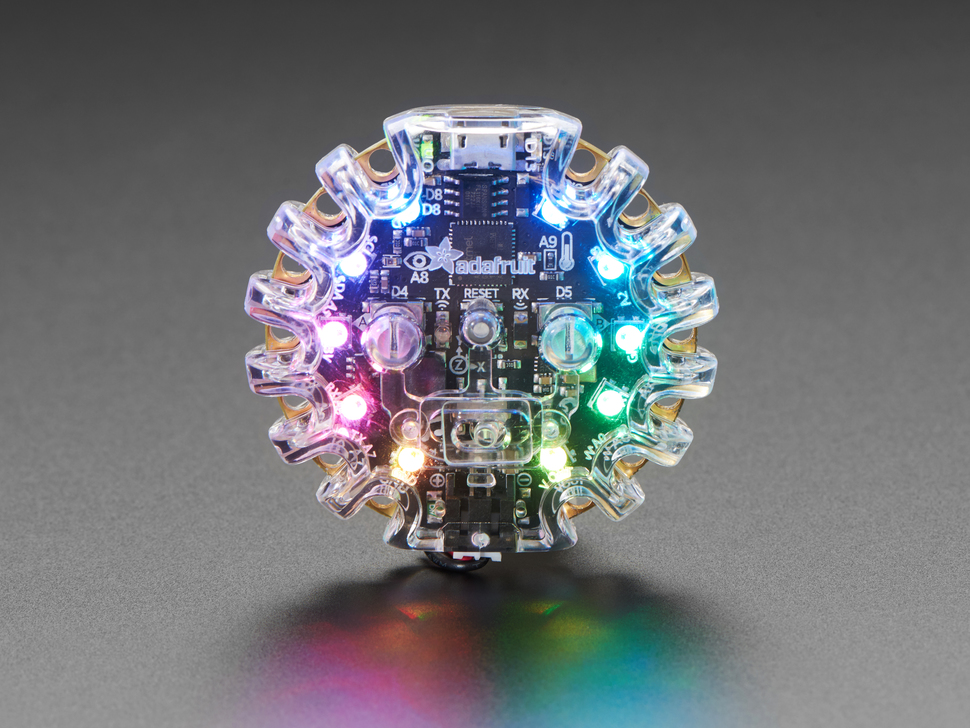
Overview
We’ve got nice cases for many of our beloved boards, but the Circuit Playground Express and Circuit Playground Bluefruit has been left out of couture enclosure game. Enter Ada-friend Mike Doell to the rescue! This minimal but elegant acrylic case will turn your board into an electronic snowflake.
Specifications
- Dimensions (assembled): 55.5 x 52.6 x 16.3mm
- Weight: 15.5g
- Material: Clear acrylic plastic
- Assembly: Snap-together design, no tools required
- Mounting: 1/4”-20 threaded insert for camera mounts
Key Features
Tool-Free Assembly
- Snap-Together: Secure assembly without tools or screws
- Easy Access: Can be opened and closed multiple times
- Secure Fit: Holds Circuit Playground firmly in place
- Quick Assembly: Fast and simple assembly process
Functional Design
- Button Access: All buttons remain fully accessible
- Switch Access: Slide switch can be operated through case
- Touch Pads: All touch pads accessible for alligator clips
- Port Access: USB port remains accessible for programming
Protective Features
- Impact Protection: Protects against drops and impacts
- Dust Protection: Keeps dust and debris away from components
- Handling Protection: Safe handling without touching components
- Everyday Use: Suitable for regular use and handling
Mounting Options
- Ribbon Slots: Two slots for ribbon or webbing up to 1”/25mm wide
- Camera Mount: 1/4”-20 threaded insert for tripod mounting
- Positioning: Compatible with camera positioning accessories
- Secure Attachment: Solid mounting for fixed installations
Compatibility
Supported Boards
- Circuit Playground Express: Perfect fit and full functionality
- Circuit Playground Bluefruit: Complete compatibility
- Circuit Playground Classic: NOT COMPATIBLE - will not fit
Functional Compatibility
- NeoPixels: Crystal clear case shows all LED colors
- Light Sensor: Works perfectly through clear case
- IR Communication: IR signals pass through case unobstructed
- Audio: Sound passes through case with minimal attenuation
- Sensors: All sensors function normally
Design Features
Optical Properties
- Crystal Clear: Transparent acrylic for full visibility
- NeoPixel Display: Excellent light transmission for LEDs
- No Color Distortion: True color representation
- Light Sensor: Minimal impact on light sensor operation
Audio Performance
- Sound Transmission: Audio passes through various small openings
- Minimal Attenuation: Barely noticeable difference in volume
- Speaker Protection: Protects speaker while maintaining function
- Microphone Access: Microphone remains functional
Mechanical Design
- Precise Fit: Engineered specifically for Circuit Playground
- Secure Retention: Holds board firmly without stress
- Easy Removal: Board can be removed when needed
- Durable Construction: Robust acrylic construction
Assembly Process
Package Contents
- 2x Molded plastic halves (top and bottom)
- Button actuators pre-installed
- 1/4”-20 threaded insert installed
- No additional hardware required
Assembly Steps
- Prepare Board: Ensure Circuit Playground is clean and functional
- Place in Bottom: Position board in bottom half of case
- Align Top: Position top half over bottom
- Snap Together: Press halves together until they snap securely
- Test Functions: Verify all buttons and functions work
Disassembly
- Locate Tabs: Find snap tabs around case perimeter
- Press Tabs: Gently press tabs while separating halves
- Remove Board: Carefully remove Circuit Playground
- Store Safely: Keep case halves together for reassembly
Applications
Educational Use
- Classroom Protection: Protect boards in educational environments
- Student Projects: Safe handling for student use
- Demonstration: Professional appearance for demonstrations
- Long-term Use: Extended protection for repeated use
Project Integration
- Permanent Installation: Mount in projects and enclosures
- Wearable Projects: Safe integration into wearable electronics
- Display Projects: Professional appearance for exhibitions
- Portable Projects: Protection during transport and use
Professional Use
- Product Development: Protect prototypes during development
- Testing: Safe handling during testing and validation
- Demonstration: Professional appearance for client demos
- Trade Shows: Attractive display for exhibitions
Mounting and Installation
Ribbon/Webbing Mounting
- Slot Width: Up to 1”/25mm wide material
- Material Types: Ribbon, webbing, straps, fabric
- Secure Attachment: Slots hold material firmly
- Adjustable: Can be repositioned as needed
Camera Mount System
- Thread: Standard 1/4”-20 camera thread
- Compatibility: Works with all camera accessories
- Tripods: Mount on any standard tripod
- Positioning Arms: Use with articulating arms
- Clamps: Compatible with various clamp systems
Installation Examples
- Tripod Mounting: Stable platform for demonstrations
- Desk Mounting: Clamp to desk or workbench
- Wall Mounting: Use wall-mount camera accessories
- Vehicle Mounting: Dashboard or console mounting
Protection Level
Physical Protection
- Impact Resistance: Protects against drops and impacts
- Scratch Protection: Prevents scratches on board surface
- Component Protection: Shields delicate components
- Handling Safety: Safe handling without component damage
Environmental Protection
- Dust Protection: Keeps dust and debris away
- Moisture Resistance: Some protection from light moisture
- Chemical Protection: Protects from skin oils and chemicals
- UV Protection: Acrylic provides some UV protection
Limitations
- Not Waterproof: Not suitable for wet environments
- Not Weatherproof: Not for outdoor permanent installation
- Limited Sealing: Not hermetically sealed
- Temperature: Standard acrylic temperature limitations
Maintenance and Care
Cleaning
- Mild Soap: Clean with mild soap and water
- Soft Cloth: Use soft, lint-free cloth
- Avoid Solvents: Don’t use harsh chemicals or solvents
- Dry Thoroughly: Ensure completely dry before reassembly
Storage
- Keep Together: Store halves together to prevent loss
- Avoid Stress: Don’t stack heavy items on case
- Temperature: Store at room temperature
- Protect from Scratches: Store in protective environment
Troubleshooting
Assembly Issues
- Won’t Snap: Check for obstructions or misalignment
- Loose Fit: Verify correct board model and case orientation
- Button Problems: Ensure button actuators properly positioned
- Stress Cracks: Avoid over-forcing during assembly
Functional Issues
- Button Not Working: Check button actuator alignment
- Switch Problems: Verify switch actuator position
- Touch Pad Issues: Ensure pads accessible through case
- Audio Problems: Check for obstructions in audio path
Mounting Issues
- Thread Problems: Verify 1/4”-20 thread compatibility
- Loose Mount: Check threaded insert tightness
- Ribbon Slipping: Ensure proper ribbon width and material
- Stability Issues: Use appropriate mounting hardware
Package Contents
- 2x Molded plastic halves (clear acrylic)
- Button actuators (pre-installed)
- 1/4”-20 threaded insert (pre-installed)
- Documentation and assembly instructions
Important Notes
- Express/Bluefruit Only: Not compatible with Circuit Playground Classic
- No Board Included: Circuit Playground sold separately
- Not Waterproof: Provides basic protection only
- Tool-Free: No tools required for assembly
- Reversible: Can be assembled and disassembled multiple times
Advantages
- Professional Appearance: Clean, finished look for projects
- Full Functionality: All features remain accessible
- Easy Assembly: No tools or special skills required
- Mounting Options: Multiple mounting and attachment methods
- Affordable: Low-cost protection solution
Limitations
- Limited Protection: Not waterproof or weatherproof
- Compatibility: Only fits Express and Bluefruit models
- Optical Clarity: May show fingerprints and scratches over time
- Size Increase: Adds bulk to the board
- Access: Requires disassembly for some modifications
Recommended Use Cases
- Educational Environments: Classroom and workshop protection
- Demonstration Projects: Professional appearance for demos
- Permanent Installations: Mount in projects and displays
- Portable Projects: Protection during transport and handling
- Wearable Integration: Safe integration into wearable projects
Recommended Accessories
- Standard 1/4”-20 camera mounting accessories
- Ribbon or webbing for strap mounting
- Tripods and positioning arms for demonstrations
- Cleaning supplies for maintenance
- Additional enclosures for multiple boards