Important NoteThis entire repo was AI created - including all of the data within. The intent was to A) help me with my personal electronics inventory; and B) see how I could use AI to make that process a bit easier. DO NOT TRUST!
Circuit Playground TFT Gizmo - Bolt-on Display + Audio Amplifier
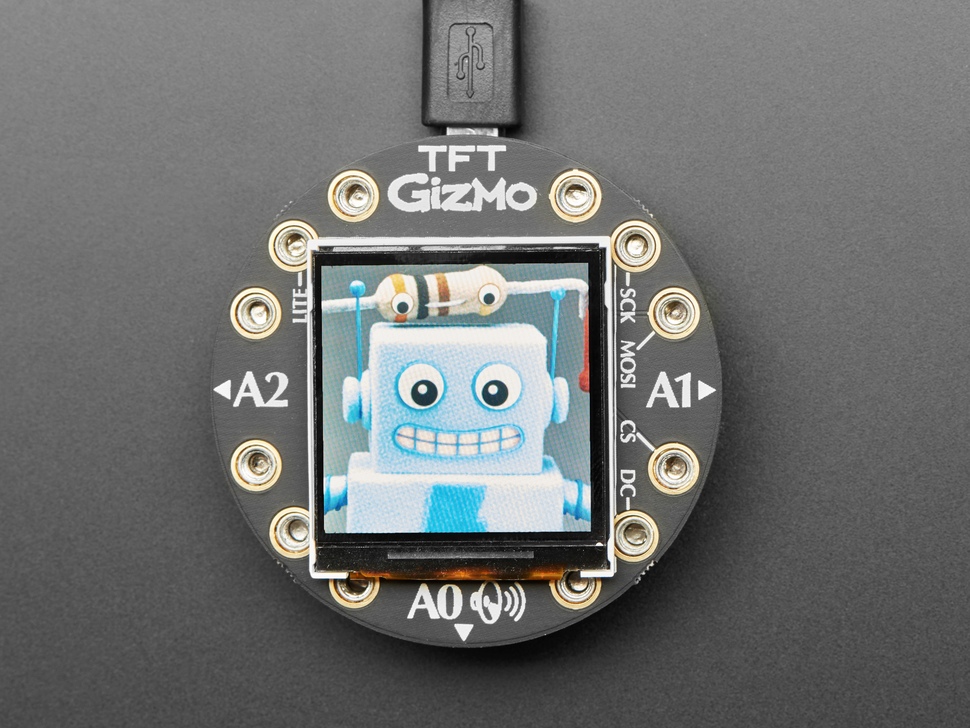
Overview
Extend and expand your Circuit Playground projects with a bolt-on TFT Gizmo that lets you add a lovely color display in a sturdy and reliable fashion. This PCB looks just like a round TFT breakout but has permanently affixed M3 standoffs that act as mechanical and electrical connections.
Specifications
- Display: 1.54” 240x240 IPS TFT
- Outer Diameter: 53.3mm x 53.3mm
- Height: 9.4mm / 0.4”
- Weight: 23.0g / 0.8oz
- Standoff Height: 8mm (as of Oct 30, 2019)
- Material: FR4 PCB with pre-soldered standoffs
Key Features
High-Quality Display
- 1.54” IPS TFT: 240x240 pixel resolution
- Full Color: 16-bit color depth (65,536 colors)
- IPS Technology: Wide viewing angles and excellent color reproduction
- Backlight Control: PWM backlight control for brightness adjustment
- Fast SPI: High-speed SPI interface for smooth graphics
Audio Amplifier
- Class D Amplifier: High-efficiency audio amplification
- Speaker Connector: Molex PicoBlade connector for speakers
- 3W Maximum: Up to 3W audio output power
- Low Distortion: Clean audio reproduction
- Volume Control: Software-controlled volume
Expansion Connectors
- 2x STEMMA Connectors: 3-pin JST PH connectors
- NeoPixel Support: Connect NeoPixel strips directly
- Servo Support: Connect servos for motion control
- Sensor Integration: Connect STEMMA-compatible sensors
- Modular Design: Easy expansion and customization
Mechanical Design
- Bolt-On: Secure mechanical connection to Circuit Playground
- M3 Standoffs: Pre-soldered 8mm standoffs for proper spacing
- Battery Clearance: 8mm height provides room for LiPo battery underneath
- Stable Platform: Rigid connection for reliable operation
- Removable: Can be attached and detached multiple times
Circuit Playground Compatibility
Supported Boards
- Circuit Playground Express: Recommended for best performance
- Circuit Playground Bluefruit: Excellent performance with BLE
- Circuit Playground Classic: Works but slow (not recommended)
Performance Notes
- Express/Bluefruit: Fast SPI hardware for smooth graphics
- Classic: Bit-banged SPI results in very slow display updates
- CircuitPython: Limited memory on Express, Bluefruit recommended
- Arduino: Full functionality on all supported boards
Display Specifications
Technical Details
- Resolution: 240 x 240 pixels
- Color Depth: 16-bit (RGB565)
- Viewing Angle: 170° (IPS technology)
- Brightness: Adjustable via PWM backlight control
- Interface: SPI communication
- Driver IC: ST7789 or compatible
Graphics Capabilities
- Text Display: Multiple font sizes and styles
- Graphics: Lines, circles, rectangles, filled shapes
- Images: Display bitmap images and sprites
- Animations: Smooth animations with fast refresh
- Color: Full 16-bit color support
Audio System
Amplifier Specifications
- Type: Class D digital amplifier
- Power Output: Up to 3W into 4-8 ohm speakers
- Efficiency: High efficiency for battery operation
- THD: Low total harmonic distortion
- Frequency Response: Full audio range
Speaker Compatibility
- Connector: Molex PicoBlade 2-pin connector
- Impedance: 4-8 ohm speakers supported
- Power: Up to 3W continuous
- Size: Various speaker sizes compatible
- Mounting: Speakers can be mounted externally
STEMMA Connectivity
Connector Specifications
- Type: JST PH 3-pin connectors
- Voltage: 3.3V logic, 5V power available
- Current: Adequate current for most STEMMA devices
- Pinout: Power, Ground, Signal/Data
- Compatibility: Standard STEMMA ecosystem
Compatible Devices
- NeoPixel Strips: Direct connection for LED strips
- Servos: Standard 3-pin servo connection
- Sensors: STEMMA-compatible sensors
- Actuators: Motors, solenoids, relays
- Custom Devices: Any 3-pin STEMMA device
Programming Support
Arduino IDE
- Full Support: Complete Arduino IDE compatibility
- Graphics Libraries: Adafruit GFX library support
- Display Driver: ST7789 library for display control
- Audio Libraries: Audio playback and generation
- Example Code: Comprehensive example collection
CircuitPython
- Display Support: displayio library for graphics
- Touch Support: Capacitive touch integration
- Audio Support: Built-in audio playback
- File System: Store images and sounds on flash
- Interactive Development: REPL for live coding
MakeCode
- Limited Support: Basic display functionality
- Block Programming: Visual programming interface
- Educational: Good for learning and simple projects
- Graphics: Basic graphics and text display
Applications
Educational Projects
- Interactive Displays: Show sensor data and status
- Learning Tools: Visual programming feedback
- Science Projects: Data visualization and logging
- Art Projects: Digital art and animations
Practical Applications
- Status Displays: System status and monitoring
- User Interfaces: Menu systems and controls
- Data Loggers: Visual data presentation
- Gaming: Simple games and interactive entertainment
Creative Projects
- Digital Art: Animated displays and light shows
- Interactive Installations: Motion-responsive displays
- Wearable Electronics: Costume and fashion integration
- Home Automation: Control panels and status displays
Power Requirements
Power Consumption
- Display: Varies with brightness and content
- Backlight: Major power consumer
- Audio: Additional power when amplifier active
- STEMMA Devices: Additional power for connected devices
Power Management
- Backlight Control: Reduce brightness to save power
- Sleep Modes: Turn off display when not needed
- Audio Control: Disable amplifier when not in use
- Efficient Operation: Optimize for battery life
Assembly and Installation
Package Contents
- 1x Circuit Playground TFT Gizmo PCB
- 12x M3 screws for attachment
- Pre-soldered M3 standoffs (8mm height)
- Documentation and getting started guide
Installation Process
- Align Boards: Position Gizmo over Circuit Playground
- Insert Screws: Use provided M3 screws
- Tighten Evenly: Ensure even pressure and good contact
- Test Connection: Verify mechanical and electrical connection
- Program: Upload test code to verify functionality
Best Practices
- Handle Carefully: Avoid excessive force during assembly
- Check Alignment: Ensure proper pin alignment
- Test Incrementally: Verify each function as you build
- Document Setup: Keep notes on configuration and connections
Troubleshooting
Display Issues
- Blank Display: Check power and SPI connections
- Garbled Graphics: Verify SPI timing and connections
- Dim Display: Adjust backlight PWM settings
- Color Problems: Check color depth and driver settings
Audio Issues
- No Sound: Verify speaker connections and amplifier enable
- Distorted Audio: Check speaker impedance and power levels
- Low Volume: Adjust software volume settings
- Noise: Check power supply and grounding
Connection Issues
- Loose Connection: Check screw tightness and standoff alignment
- Intermittent Operation: Verify all electrical connections
- STEMMA Problems: Check connector orientation and power
- Communication Errors: Verify SPI configuration and timing
Package Contents
- 1x Circuit Playground TFT Gizmo (assembled)
- 12x M3 screws for attachment
- Pre-soldered 8mm M3 standoffs
- Documentation and example code access
Important Notes
- Standoff Height: 8mm standoffs allow LiPo battery underneath
- Performance: Express/Bluefruit recommended for best performance
- Memory: CircuitPython works better on Bluefruit due to memory
- Classic Compatibility: Works but very slow, not recommended
- Speaker Required: Audio amplifier requires external speaker
Advantages
- High-Quality Display: Excellent IPS display with great colors
- Audio Integration: Built-in amplifier for sound projects
- Expansion Options: STEMMA connectors for easy expansion
- Secure Mounting: Robust mechanical connection
- Professional Appearance: Clean, finished look
Limitations
- Size Constraints: Limited by Circuit Playground form factor
- Power Consumption: Display and audio can drain battery quickly
- Classic Performance: Very slow on Circuit Playground Classic
- Cost: More expensive than basic displays
- Complexity: More complex than simple displays
Recommended Accessories
- Compatible speakers with Molex PicoBlade connectors
- NeoPixel strips for STEMMA connectors
- Servos for motion control projects
- LiPo battery for portable operation
- STEMMA-compatible sensors and actuators