Important NoteThis entire repo was AI created - including all of the data within. The intent was to A) help me with my personal electronics inventory; and B) see how I could use AI to make that process a bit easier. DO NOT TRUST!
Pixy2 Camera
Smart vision sensor designed for robotics applications with advanced object detection and line following capabilities at 60 frames per second.
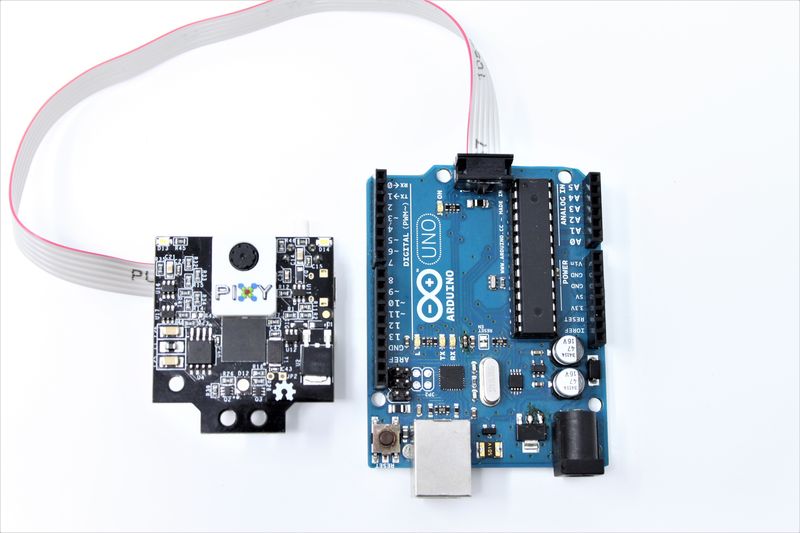
Pixy2 Camera - Smart vision sensor with Arduino and Raspberry Pi connectivity
Overview
Pixy2 is a fast, easy-to-use vision sensor that can learn to detect objects you teach it, just by pressing a button. It’s smaller, faster, and more capable than the original Pixy camera, specifically designed for robotics applications where speed and simplicity are crucial.
Key Features
Performance
- 60 frames per second processing speed
- Smaller and faster than original Pixy
- Real-time processing for fast-moving robots
- Low latency object detection and tracking
Vision Capabilities
- Object Detection: Learn and detect custom objects
- Line Following: Advanced line detection algorithms
- Intersection Detection: Recognizes line intersections
- Road Sign Recognition: Detects custom “road signs” for robot commands
- Color-based Tracking: Robust color signature detection
Technical Specifications
Image Processing
- Resolution: Optimized for real-time robotics applications
- Frame Rate: 60 FPS continuous processing
- Detection Speed: Real-time object and line detection
- Learning Mode: One-button object teaching
- Multiple Object Tracking: Can track multiple objects simultaneously
Communication Interfaces
- SPI: High-speed serial communication
- I2C: Standard two-wire interface
- UART: Asynchronous serial communication
- USB: Direct computer connection
- Simple Protocol: Easy-to-understand data format
I/O Connector Pinout
10-pin IDC Connector (2x5 pins):
| Pin | Signal | Description |
|---|---|---|
| 1 | SPI MISO / UART RX / GPIO0 | SPI Master In Slave Out / UART Receive / Digital I/O |
| 2 | VCC | 5V Power Input |
| 3 | SPI SCK | SPI Clock |
| 4 | SPI MOSI / UART TX | SPI Master Out Slave In / UART Transmit |
| 5 | I2C SCL | I2C Clock Line |
| 6 | GND | Ground |
| 7 | SPI SS | SPI Slave Select (optional) |
| 8 | DAC OUT | Analog Output (0-3.3V) |
| 9 | I2C SDA | I2C Data Line |
| 10 | SERVO | Servo Control Output |
Notes:
- All digital pins are 3.3V output, 5V tolerant input
- Pin functions depend on selected interface mode
- Default interface is Arduino ICSP SPI (pins 1, 3, 4)
Connectivity
Direct Arduino Connection
- Special Cable Included: No need for jumper wires
- Plug-and-Play: Direct connection to Arduino boards
- Arduino Library: Pre-built software library available
- Example Code: Ready-to-use sketches provided
Raspberry Pi Support
- USB Connection: Standard USB cable included
- Python Library: Full Python support
- Linux Compatible: Works with Raspberry Pi OS
- Cross-platform: Compatible with various Linux distributions
Universal Compatibility
- Multiple Interfaces: SPI, I2C, UART, USB options
- 5V and 3.3V Logic: Compatible with both voltage levels
- Simple Commands: Easy integration with any microcontroller
- Minimal Wiring: Reduced complexity for quick prototyping
Software and Programming
Ease of Use
- Simplified Programming: Only sends relevant data
- Filtered Output: Receives only detected object information
- Coordinate System: X-Y coordinates, size, and unique ID
- Reduced Processing: Microcontroller handles only decision-making
Development Support
- Arduino Libraries: Pre-built functions and examples
- Raspberry Pi Libraries: Python modules available
- Documentation: Comprehensive wiki and tutorials
- Community Support: Active forums and user community
Open Source
- Open Hardware: Complete hardware design files available
- Open Software: Source code freely available
- Open Firmware: Customizable firmware
- Extensible: Can be modified for specific applications
Applications
Robotics
- Line Following Robots: Advanced line detection with intersection handling
- Object Sorting: Color-based object identification and sorting
- Navigation: Visual landmark recognition
- Autonomous Vehicles: Simple computer vision for robot cars
- Pet Robots: Object recognition for interactive behaviors
Educational Projects
- STEM Learning: Computer vision concepts made accessible
- Programming Education: Simple API for learning robotics
- Competition Robots: Fast performance for robotics competitions
- Maker Projects: Easy integration into DIY projects
Industrial Applications
- Quality Control: Simple object inspection systems
- Sorting Systems: Color-based part sorting
- Position Detection: Object location and orientation
- Automation: Vision-guided assembly systems
Advanced Features
Line Following Algorithms
- Vector-based Detection: More robust than simple line following
- Intersection Recognition: Handles complex path layouts
- Road Sign Detection: Custom markers for robot commands
- Branch Detection: Recognizes path splits and merges
Object Detection
- Color Signatures: Learns complex color patterns
- Shape Recognition: Basic shape detection capabilities
- Multiple Objects: Simultaneous tracking of different objects
- Lighting Adaptation: Robust performance in varying light conditions
Physical Specifications
Form Factor
- Compact Design: Smaller than original Pixy
- Lightweight: Suitable for small robots
- Mounting Options: Standard mounting holes
- Camera Module: Integrated lens and sensor
Power Requirements
- Low Power: Efficient operation for battery-powered robots
- 5V Operation: Standard logic voltage
- USB Powered: Can be powered via USB connection
- External Power: Accepts external power supply
Getting Started
Quick Setup
- Connect: Use included cable for Arduino or USB for Raspberry Pi
- Install Software: Download PixyMon configuration software
- Teach Objects: Press button to learn object signatures
- Program: Use provided libraries and examples
- Deploy: Run your robot with real-time vision
Learning Process
- One-Button Teaching: Simply press button while showing object
- Multiple Signatures: Can learn several different objects
- Signature Management: Easy to add, remove, or modify learned objects
- Visual Feedback: LED indicators show detection status
Support and Resources
Documentation
- Comprehensive Wiki: Detailed documentation online
- Video Tutorials: Step-by-step video guides
- Example Projects: Ready-to-build project ideas
- API Reference: Complete programming interface documentation
Community
- Active Forums: User community support
- GitHub Repository: Source code and examples
- Regular Updates: Ongoing firmware and software improvements
- Email Support: Direct technical support available
Storage Information
- Location: Cabinet 3, Bin 27
- Quantity: 2 units
- Condition: New, unused
- Packaging: Original retail packaging with cables
- Accessories: Includes Arduino connection cable and USB cable