Important NoteThis entire repo was AI created - including all of the data within. The intent was to A) help me with my personal electronics inventory; and B) see how I could use AI to make that process a bit easier. DO NOT TRUST!
Raspberry Pi Pico 2W
Details
- Location: Cabinet-1, Bin 32
- Category: Microcontroller Boards
- Type: RP2350 Development Board with WiFi & Bluetooth (Pico Form Factor)
- Microcontroller: RP2350 (Dual ARM Cortex-M33 or RISC-V Hazard3 @ 150MHz)
- Brand: Raspberry Pi Foundation
- Part Number: 6087
- Quantity: 3
- Product URL: https://www.adafruit.com/product/6087
Description
The Raspberry Pi Pico 2W is the Foundation’s latest wireless microcontroller board, built on the new RP2350 chip. It features dual-architecture capability (ARM Cortex-M33 or RISC-V Hazard3), WiFi, Bluetooth LE/Classic, and significant performance improvements over the original Pico while maintaining full pin compatibility.
Specifications
- Microcontroller: RP2350 dual-core @ 150MHz (ARM Cortex-M33 or RISC-V Hazard3)
- Memory: 520KB on-chip SRAM, 4MB on-board QSPI Flash
- WiFi: 802.11n single-band 2.4GHz with WPA3 support
- Bluetooth: Bluetooth LE and Bluetooth Classic via Infineon CYW43439
- GPIO Pins: 26 multi-purpose pins
- ADC: 4x 12-bit analog inputs
- PWM: 24 PWM channels
- Peripherals: 2x UART, 2x SPI, 2x I2C, USB 1.1 controller
- PIO: 3 blocks with 4 state machines each (12 total)
- Power: 1.8-5.5V DC input
- Operating Temperature: -20°C to +85°C
Dimensions
- Board Size: 21mm x 51mm (0.83” x 2.0”)
- Weight: ~3g
- Form Factor: Standard Pico compatible
Image
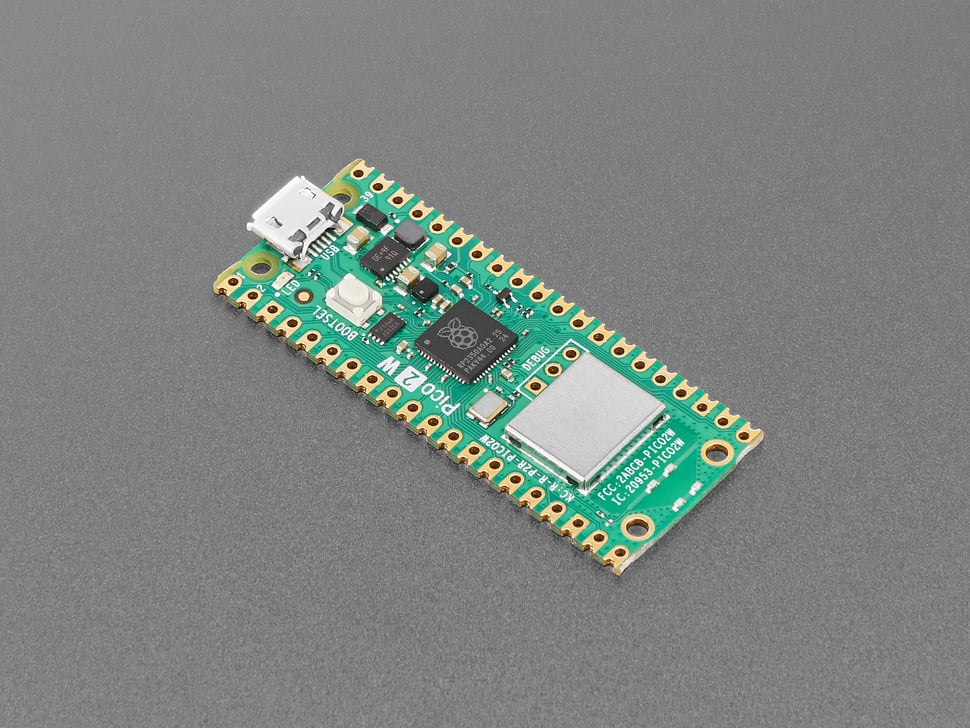
Features
- Dual Architecture: Choose between ARM Cortex-M33 or RISC-V Hazard3 cores
- Enhanced Performance: 2x faster than RP2040, with FPU on M33 cores
- Expanded Memory: 2x SRAM (520KB) and 2x Flash (4MB) vs original Pico
- Wireless Connectivity: WiFi 802.11n and Bluetooth LE/Classic
- Security Features: ARM TrustZone, signed boot, hardware TRNG, SHA-256 acceleration
- Advanced Peripherals: HSTX for high-speed transmission, additional PIO block
- Pin Compatibility: Fully compatible with original Pico and accessories
- Soft Access Point: Support up to 4 WiFi clients
- Programming Options: C/C++, CircuitPython, MicroPython, Arduino IDE
Wireless Capabilities
- WiFi: 802.11n 2.4GHz with WPA3 security
- Access Point Mode: Support up to 4 connected clients
- Bluetooth LE: Low energy wireless communication
- Bluetooth Classic: Traditional Bluetooth connectivity
- Antenna: On-board antenna (licensed from ABRACON/ProAnt)
Security Features
- ARM TrustZone for Cortex-M security architecture
- Signed boot capability
- 8KB antifuse OTP for secure key storage
- Hardware True Random Number Generator (TRNG)
- SHA-256 hardware acceleration
- Fast glitch detection
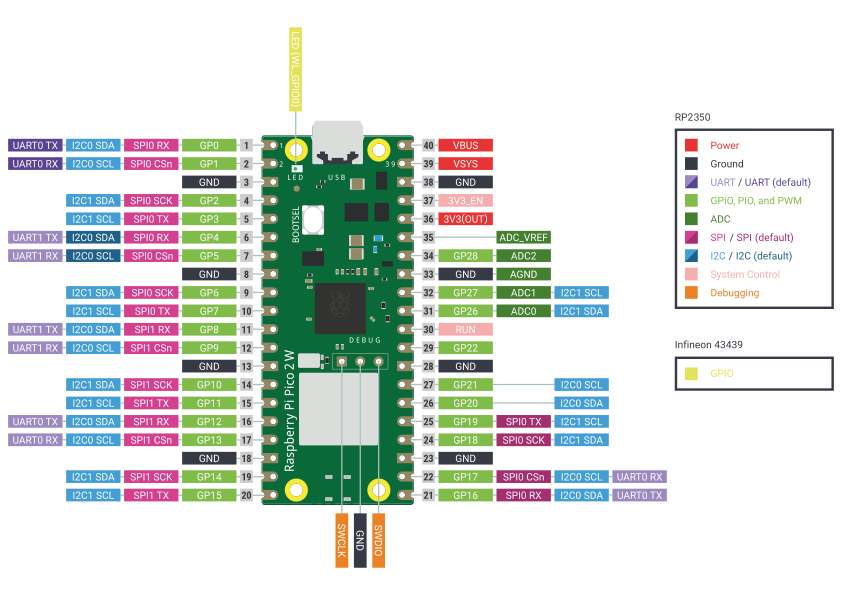
Pinout Diagram
Official Raspberry Pi Pico 2W Pinout
Basic Wiring Examples
LED Blink Circuit
Pico 2W Pin GP25 → Built-in LED (no external wiring needed)
OR
Pico 2W Pin GP2 → LED Anode (long leg)
LED Cathode (short leg) → 220Ω Resistor → Pico 2W GND

Note: Pin GP25 controls built-in LED
Button Input Circuit
Pico 2W 3V3 → 10kΩ Pull-up Resistor → Pico 2W Pin GP15
Pico 2W Pin GP15 → Button → Pico 2W GND

Code: Pin(15, Pin.IN, Pin.PULL_UP).value() returns 1 when not pressed, 0 when pressed
I2C Device Connection
I2C Device VCC → Pico 2W 3V3
I2C Device GND → Pico 2W GND
I2C Device SDA → Pico 2W Pin GP4 (I2C0 SDA)
I2C Device SCL → Pico 2W Pin GP5 (I2C0 SCL)

Alternative I2C: Pin GP2 (SDA1), Pin GP3 (SCL1)
SPI Device Connection
SPI Device VCC → Pico 2W 3V3
SPI Device GND → Pico 2W GND
SPI Device SCK → Pico 2W Pin GP18 (SPI0 SCK)
SPI Device MOSI → Pico 2W Pin GP19 (SPI0 TX)
SPI Device MISO → Pico 2W Pin GP16 (SPI0 RX)
SPI Device CS → Pico 2W Pin GP17 (SPI0 CSn)
Analog Sensor Reading
Sensor Output → Pico 2W Pin GP26, GP27, GP28, or GP29 (ADC0-3)
Sensor VCC → Pico 2W 3V3
Sensor GND → Pico 2W GND

Code: ADC(0).read_u16() returns 0-65535 (0-3.3V)
UART Communication
Device TX → Pico 2W Pin GP1 (UART0 RX)
Device RX → Pico 2W Pin GP0 (UART0 TX)
Device VCC → Pico 2W 3V3
Device GND → Pico 2W GND

Alternative UART: Pin GP4 (TX1), Pin GP5 (RX1)
Battery Power Connection
LiPo Battery + → Pico 2W VSYS
LiPo Battery - → Pico 2W GND
Battery voltage monitoring → Pico 2W Pin GP29 (ADC3)

Note: VSYS accepts 1.8V-5.5V input
Programming Setup Guide
MicroPython Setup (Recommended)
- Download MicroPython UF2 from micropython.org
- Hold BOOTSEL button while connecting USB
- Drag UF2 file to RPI-RP2 drive
- Board reboots with MicroPython
- Use Thonny IDE or terminal for programming
CircuitPython Setup
- Download CircuitPython UF2 from circuitpython.org
- Hold BOOTSEL button while connecting USB
- Drag UF2 file to RPI-RP2 drive
- Board reboots as CIRCUITPY drive
- Edit code.py to program
Arduino IDE Setup
- Install Arduino IDE
- Add RP2040 board package URL in preferences
- Install “Raspberry Pi Pico/RP2040” boards
- Select “Raspberry Pi Pico 2” from Tools → Board
- Hold BOOTSEL for first upload
Programming Examples
MicroPython - WiFi Connection
import network
import time

# Connect to WiFi
wlan = network.WLAN(network.STA_IF)
wlan.active(True)
wlan.connect('YOUR_SSID', 'YOUR_PASSWORD')

# Wait for connection
while not wlan.isconnected():
    print('Connecting to WiFi...')
    time.sleep(1)

print('Connected to WiFi')
print('IP address:', wlan.ifconfig()[0])
MicroPython - HTTP Request
import network
import urequests
import time

# Connect to WiFi (use code from above)
wlan = network.WLAN(network.STA_IF)
wlan.active(True)
wlan.connect('YOUR_SSID', 'YOUR_PASSWORD')

while not wlan.isconnected():
    time.sleep(1)

print('Connected to WiFi')

# Make HTTP request
try:
    response = urequests.get('http://httpbin.org/json')
    print('Response:', response.json())
    response.close()
except Exception as e:
    print('Error:', e)
MicroPython - Bluetooth LE Beacon
import bluetooth
import struct
import time
from machine import Pin

# Initialize Bluetooth
ble = bluetooth.BLE()
ble.active(True)

# LED for status indication
led = Pin(25, Pin.OUT)

def ble_advertise():
    # Create advertising data
    name = "Pico2W-Beacon"
    payload = struct.pack('<B', len(name) + 1) + struct.pack('<B', 0x09) + name.encode()

    # Start advertising
    ble.gap_advertise(100, payload)
    print("Advertising as:", name)

# Start advertising
ble_advertise()

while True:
    led.toggle()
    time.sleep(1)
MicroPython - Web Server
import network
import socket
import time
from machine import Pin

# Setup WiFi
wlan = network.WLAN(network.STA_IF)
wlan.active(True)
wlan.connect('YOUR_SSID', 'YOUR_PASSWORD')

while not wlan.isconnected():
    time.sleep(1)

print('Connected to WiFi')
print('IP address:', wlan.ifconfig()[0])

# Setup LED
led = Pin(25, Pin.OUT)

# Create socket
addr = socket.getaddrinfo('0.0.0.0', 80)[0][-1]
s = socket.socket()
s.bind(addr)
s.listen(1)

print('Listening on', addr)

# Web server loop
while True:
    cl, addr = s.accept()
    print('Client connected from', addr)

    request = cl.recv(1024)
    request = str(request)

    # Parse request
    if 'GET /led/on' in request:
        led.on()
        response = "LED ON"
    elif 'GET /led/off' in request:
        led.off()
        response = "LED OFF"
    else:
        response = """
        <html>
        <body>
        <h1>Pico 2W Web Server</h1>
        <p><a href="/led/on">Turn LED ON</a></p>
        <p><a href="/led/off">Turn LED OFF</a></p>
        </body>
        </html>
        """

    # Send response
    cl.send('HTTP/1.0 200 OK\r\nContent-type: text/html\r\n\r\n')
    cl.send(response)
    cl.close()
Important Notes
Power Considerations
- 3.3V Logic: All GPIO pins are 3.3V logic level
- USB Power: Powered via USB with automatic switching
- Battery Power: VSYS accepts 1.8V-5.5V input
- Current Limit: 600mA peak from onboard regulator
- Power Monitoring: Battery voltage available on ADC3
WiFi Performance
- 2.4GHz Only: Single-band 802.11n wireless
- WPA3 Support: Modern security protocols
- Range: Typical indoor range 30-50 meters
- Antenna: Onboard PCB antenna (keep clear of metal)
- Power Consumption: ~80mA during active WiFi transmission
Bluetooth Capabilities
- Bluetooth 5.2: LE and Classic support
- Central/Peripheral: Both roles supported
- Range: Typical 10-30 meters depending on power class
- Concurrent: Can run WiFi and Bluetooth simultaneously
Programming Considerations
- Dual Architecture: Choose ARM Cortex-M33 or RISC-V Hazard3
- Memory: 520KB SRAM, 4MB Flash
- PIO Blocks: 3 blocks with 4 state machines each
- Wireless Libraries: Built-in support for networking protocols
Applications
- IoT Projects: WiFi and Bluetooth connectivity for smart home devices
- Wireless Sensor Networks: Remote monitoring and data collection
- Edge Computing: Local AI/ML processing with wireless communication
- Robotics: Wireless control and telemetry for autonomous systems
- Educational Projects: Learning embedded systems with modern connectivity
- Prototyping: Rapid development of connected devices
- Industrial Automation: Wireless monitoring and control systems
- Wearable Technology: Bluetooth-enabled fitness and health devices
Programming Support
- CircuitPython/MicroPython: Enhanced support with 4MB Flash
- Arduino IDE: Full Arduino compatibility
- C/C++ SDK: Official Raspberry Pi SDK
- RISC-V Development: Affordable entry into RISC-V programming
Tags
microcontroller, rp2350, pico, raspberry-pi, wifi, bluetooth-le, bluetooth-classic, circuitpython, micropython, arduino, dual-architecture, wireless, iot
Notes
Important: This board uses the A2 version of RP2350 affected by erratum E9, which impacts some GPIO and PIO uses including high-impedance inputs and internal pulldowns. Use 8.2K or smaller resistors for pulldowns if required. The Pico 2W represents a major upgrade from the original Pico with 2x performance, 2x memory, wireless connectivity, and security features while maintaining full compatibility.