Important NoteThis entire repo was AI created - including all of the data within. The intent was to A) help me with my personal electronics inventory; and B) see how I could use AI to make that process a bit easier. DO NOT TRUST!
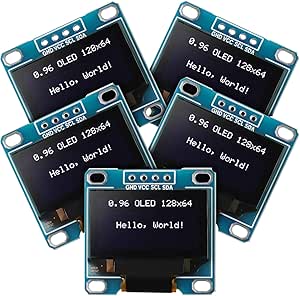
Weewooday 0.96” I2C OLED Display Module
Details
- Location: Cabinet-1, Bin 21
- Category: OLED Displays
- Type: I2C OLED Display Module
- Size: 0.96 inch diagonal
- Resolution: 128x64 pixels
- Quantity: 8
- Product URL: https://a.co/d/f5LTPiZ
Description
Weewooday 5 pieces 0.96 inch OLED display module with 128x64 pixel resolution. Features SSD1306 driver chip with I2C interface for easy connection to microcontrollers. Self-illuminated OLED technology provides excellent contrast and visibility with white display color.
Specifications
- Display Size: 0.96 inch diagonal
- Resolution: 128x64 pixels
- Driver IC: SSD1306
- Interface: I2C (SDA, SCL)
- Display Color: White
- Operating Voltage: 3.3V to 5V
- Current Consumption: ~20mA (typical)
- Power Consumption: 0.04W normal operation, 0.08W full screen lit
- Viewing Angle: >160°
- Operating Temperature: -40°C to +85°C
- Package: PCB module without pin headers
Image
Features
- Self-Illuminated: No backlight required, each pixel emits light
- High Contrast: Excellent visibility in various lighting conditions
- Low Power: Efficient OLED technology with low current consumption
- Wide Voltage Range: Compatible with 3.3V and 5V systems
- I2C Interface: Simple 2-wire communication (SDA, SCL)
- Larger Display: 0.96” vs 0.91” provides more display area
- Higher Resolution: 128x64 vs 128x32 for more content
- No Pin Headers: Requires soldering of header pins for breadboard use
Pinout
- VCC: Power supply (3.3V to 5V)
- GND: Ground
- SDA: I2C data line
- SCL: I2C clock line
Applications
- Arduino and microcontroller projects
- Raspberry Pi displays
- IoT device status displays
- Portable instruments
- Data loggers
- Weather stations
- Digital clocks
- Menu systems
- Status indicators
- Wearable electronics
Compatibility
- Arduino: All Arduino boards (Uno, Nano, ESP32, etc.)
- Raspberry Pi: All models (requires I2C enable)
- ESP8266/ESP32: Native I2C support
- STM32: Compatible with HAL I2C libraries
- Microcontrollers: Any MCU with I2C capability
- MMDVM/Pi-Star: Compatible with digital radio systems
Libraries & Resources
- Arduino: Adafruit SSD1306 library
- CircuitPython: adafruit_ssd1306
- Raspberry Pi: luma.oled library
- Documentation: SSD1306 datasheet available online
- I2C Address: Typically 0x3C (may vary from standard 0x3D)
Interface Requirements
- Power Supply: 3.3V or 5V regulated
- I2C Pullups: Usually built-in on development boards
- Pin Headers: Requires soldering for breadboard connections
- Current: Ensure adequate power supply capacity
Notes
- No Pin Headers: Displays come without headers, soldering required
- I2C Address: May be 0x3C instead of standard 0x3D - check with scanner
- Power Consumption: Lower when fewer pixels are lit
- Lifespan: OLED displays may dim over extended continuous use
- Fragile: Handle carefully, OLED screens can crack easily
- Static Sensitive: Use anti-static precautions during handling
- Quality Control: Some units may have manufacturing defects
Usage Tips
- Solder 4-pin header for easy breadboard prototyping
- Use I2C scanner to verify address before programming
- Start with lower brightness settings to extend display life
- Consider sleep modes for battery-powered applications
- Test each display individually as quality may vary
Programming Examples
- Display text and graphics
- Real-time sensor data visualization
- Menu navigation systems
- Progress bars and status indicators
- Simple animations and scrolling text
Comparison with Other OLED Displays
- vs 0.91” displays: Larger viewing area, higher resolution
- vs 128x32 displays: Double the vertical resolution
- vs Frienda displays: Similar functionality, different brand
Tags
oled-display, i2c, ssd1306, white, 128x64, weewooday, arduino, raspberry-pi